The SILDIS[0][1] software (in Excel format) allows for the simulation of noise transmission through the walls of rectangular ducts, as illustrated by an example.
Problem statement regarding the simulation of noise transmission through the walls of a rectangular air duct using SILDIS software (example)
The aim is to simulate noise transmission through the walls of a rectangular duct-measuring 18" (0.454 m) [1] by 36" (0.907 m) [2] and constructed from 22-gauge steel sheet (thickness: 0.0008806 m) [3] using the SMA model [5] for specific calculation steps where it appears in the drop-down menus; for other steps, the ZER model [6] is selected for the minimum Rdif value, and the NAT model [7] for the maximum Rdif value. The language used is French [8].
Two approaches can be used: one that accounts for the wall material and duct cross-section dimensions, and one that does not (in which case steel is implicitly assumed).
The calculations involved have practical applications, potentially within the context of engineering projects or Research and Development (R&D), and possibly involving other materials, such as:
- sizing of Heating, Ventilation, and Air Conditioning (HVAC) ductwork
Input data for the simulation of noise transmission through the walls of a rectangular air duct using SILDIS software (example)
The input data required for the calculation are listed below, referencing the information provided earlier (see the bracketed figures in the previous section, which serve as markers for the selections described below). Input cells are referenced by their Excel coordinates (column/row) in the following excerpt from the user manual.
Regarding the input data to be entered into the "in-COALA" and "in-out CORED IN->OUT" Excel sheets of the SILDIS software's Module 3, for calculating the noise reduction index of the rectangular duct wall used in this example, a distinction can be made regarding the required data:
- accounting for the wall material type and duct cross-section dimensions; in this case, the displayed results reflect all selections made:
- in the "in COALA" Excel sheet for set 0, regarding the type, density, and thickness of the thin panel
- in the "in-out CORED IN->OUT" Excel sheet, regarding the larger and smaller dimensions of the duct cross-section
- without accounting for the wall material type and duct cross-section dimensions:
- then, steel is implicitly assumed, and the displayed results reflect fewer selections across the two aforementioned Excel sheets (as certain input data are ignored); this reduces the number of rows in the input data tables (shown in italics in the first table and omitted in the second)
Input data for calculating the sound reduction index, accounting for the material of the base wall (thin panel from set 0) as entered in the "in-COALA" Excel sheet, and for the cross-sectional dimensions of the duct as entered in the "in-out CORED IN->OUT" Excel sheet
Input data to be entered in Excel worksheet "in COALA"
| Item | Cell for input | Foreseen action | Input | Landmark / comment |
| Language | AF2 | For English, select E,; for French, select F | E | [8] |
| Reference of thin plate | AB59 | Select a model (in a drop-down menu) | STEEL | [3] |
| Number of identical plates | AC68 | Enter a positive real number | 1 | imposed value[1] |
| Thickness of plates (m) | AA69 | Enter a positive real number | 0.0008806 | [4] |
Remarks:
- since the material considered for the thin plate in the example is among those with properties listed in a library, the user does not need to enter them manually (in cells AF60 onwards) and then select "BYO" (Bring Your Own) from the material reference drop-down menu in cell AB59
- for cell AD59, the user must select "2" from the drop-down menu to assign the properties of the thin plate(s) in set 2 to the thin plate(s) in set 0, with the exception of the number of unbonded stacked plates, which may differ for set 0 depending on the value entered in cell AC68
Input data to be entered in Excel worksheetl "in-out CORED IN->OUT"
| Item | Cell for input | Foreseen action | Input | Landmark / comment |
| Biggest dimension (m) | AH52 | Enter a positive real number | 0.907 | [2] |
| Smallest dimension (m) | AH53 | Enter a positive real number | 0.454 | [3] |
| Length (m) | AH54 | Enter a positive real number | 10 | other values are possible |
| Mass flow rate (kg/s) | AH56 | Enter a positive real number | 1 | other values are possible |
| Model of cross-over frequency fcr | R84 | Select a model (in a drop-down menu) | SMA | [5] |
| For f < fcr model of transmission | R88 | Select a model (in a drop-down menu) | SMA | [5] |
| For f > fcr model of transmission | R93 | Select a model (in a drop-down menu) | SMA | [5] |
| Model of minimum for Rdif | R98 | Select a model (in a drop-down menu) | SMA | [5] |
| Model of maximum for Rdif | R102 | Select a model (in a drop-down menu) | SMA | [5] |
Input data to be entered for the calculation of the sound reduction index, without taking into account the material of the base wall (thin panel from set 0) - thereby assuming a steel sheet - and without considering the cross-sectional dimensions of the duct as entered in the "in-out CORED IN->OUT" Excel sheet
Input data to be entered in Excel worksheet "in COALA"
| Item | Cell for input | Foreseen action | Input | Landmark / comment |
| Language | AF2 | Pour Anglais, choisir E; pour Français choisir F | F | [8] |
| Thickness of plates (m) | AA69 | Entrer un nombre réel positif | 0.0008806 | [4] |
Remark:
- since the material considered for the thin plate in the example is among those with properties listed in a library, the user does not need to enter them manually (in cells AF60 onwards) and then select "BYO" (Bring Your Own) from the material reference drop-down menu in cell AB59
- for cell AD59, the user must select "2" from the drop-down menu to assign the properties of the thin plate(s) in set 2 to the thin plate(s) in set 0, with the exception of the number of unbonded stacked plates, which may differ for set 0 depending on the value entered in cell AC68
Input data to be entered in Excel worksheet "in-out CORED IN->OUT"
| Item | Cell for input | Foreseen action | Input | Landmark / comment |
| Model of minimum for Rdif | R111 | Choisir un modèle (dans un menu déroulant) | SMA | [5] |
Output data: results of the simulation of noise transmission through the walls of a rectangular air duct using SILDIS software (example)
Output data: results of the sound reduction index calculation, accounting for the material of the base partition (thin panel from set 0) as entered in the "in-COALA" Excel sheet, and accounting for the cross-sectional dimensions of the duct as entered in the Excel sheet
For the example under consideration, the results of the calculation can be viewed:
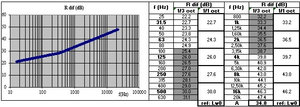
- in the Excel sheet "in-out CORED IN->OUT", regarding the sound reduction index in a pseudo-diffuse field (Rdif) (cf. Figure 1)
- curve: narrow-band (i.e. per 1/21-octave frequency band); table: per 1/3-octave and 1/1-octave frequency bands
|
Figure 1 Sound reduction index of a rectangular duct wall: taking into account the material of the base wall and the cross-sectional dimensions |
Output data: results of the sound reduction index calculation, without accounting for the material of the base partition (thin panel from set 0) as entered in the "in-COALA" Excel sheet, and without accounting for the cross-sectional dimensions of the duct as entered in the Excel sheet
For the example under consideration, the results of the calculation can be viewed:
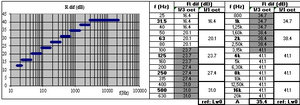
- in the Excel sheet "in-out CORED IN->OUT", regarding the sound reduction index in a pseudo-diffuse field (Rdif) (cf. Figure 2)
- curve: narrow-band (i.e. per 1/21-octave frequency band); table: per 1/3-octave and 1/1-octave frequency bands
|
Figure 2 Sound reduction index of a rectangular duct wall: without taking into account either the nature of the base wall material or the cross-sectional dimensions |
Output data: results of the insertion loss calculation for an external lagging
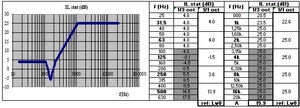
Acoustic performance could be improved by using external cladding consisting of mineral wool with a thickness of 0.05 m [9] (value to be entered in the "in COALA" Excel sheet in cell J56) covered by a steel sheet [10] ("STEEL" to be selected from the drop-down menu in the "in COALA" Excel sheet in cell AB59) with a thickness of 0.0005 m [11] (value to be entered in the "in COALA" Excel sheet in cell AA69, by entering 1 in cell AA68). The insertion loss of such cladding can be calculated by selecting the RIG model [12] in the "in-out CORED IN->OUT" Excel sheet (cell R134), with the high-frequency insertion loss limited to 25 dB [13] (value to be entered in the "in-out CORED IN->OUT" Excel sheet in cell R136).
For the example under consideration, the results of the calculation can be viewed:
- in the Excel sheet "in-out CORED IN->OUT", regarding the insertion loss (ILstat) (cf. figure 3)
- curve: narrow-band (i.e. per 1/21-octave frequency band); table: per 1/3-octave and 1/1-octave frequency bands
|
Figure 3 Insertion loss of an external lagging for a rectangular duct wall |
Output data: results of the sound transmission loss calculation for the duct wall with an external lagging
The following formula is used to evaluate sound transmission loss (to be subtracted from the internal sound power level to obtain the external sound power level): TLout = Rdif + ILstat (dB)
For the example in question, the calculation results can be viewed:
- in the "in-out CORED IN->OUT" Excel sheet, regarding sound transmission loss (TLout)
- table: by 1/1 octave frequency band
[0] Sound Impact Limitation - Design for Industrialized Solutions
[1] cf. Prediction of noise transmission through duct walls